
Introduction
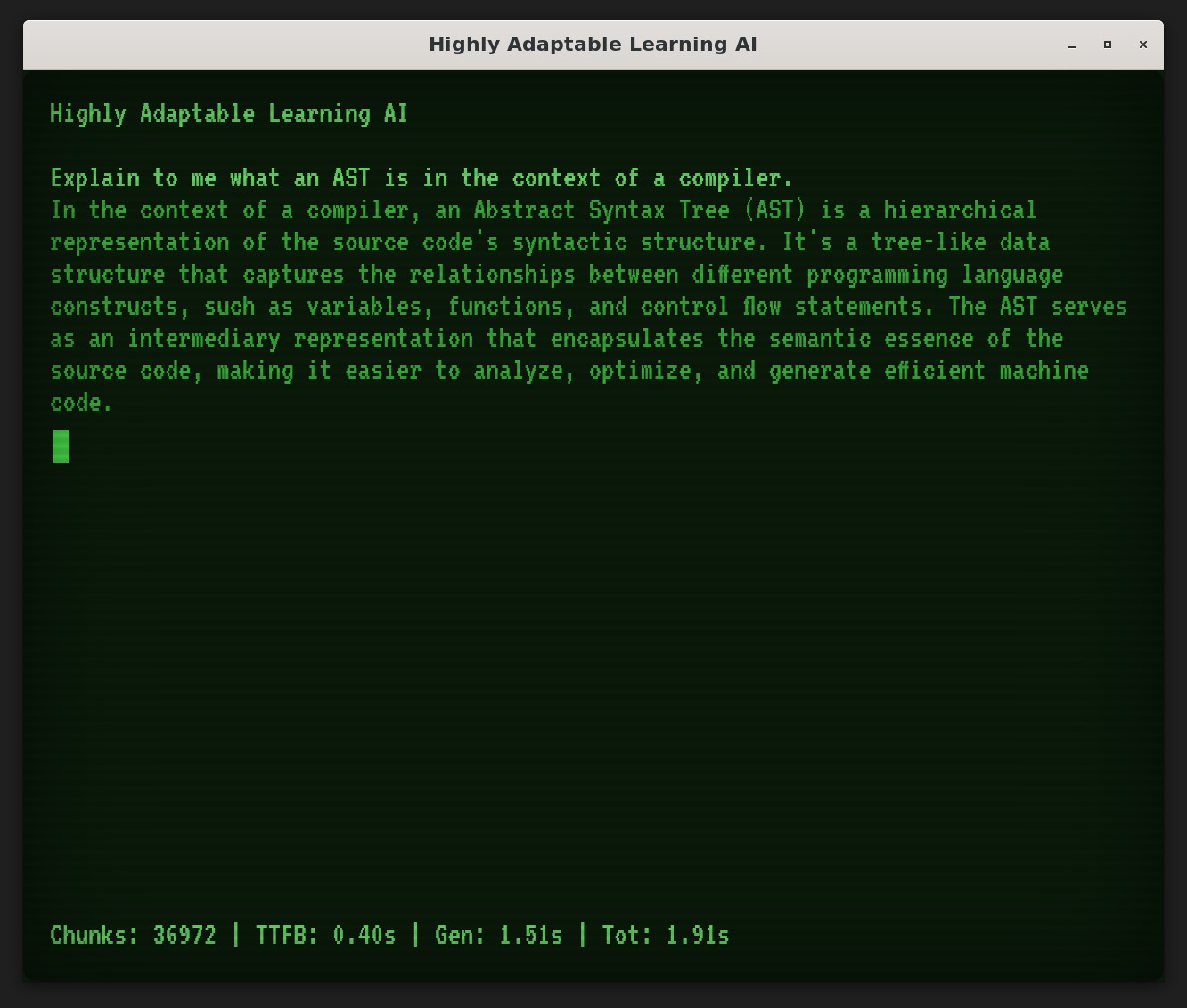
Imagine 1983: a CRT terminal, green glow filling the room, a sentient machine humming back at you through the static. Now fast-forward to 2025, and I am building HAL, an AI assistant inspired by that same retro aesthetic. It is part WarGames nostalgia trip, part serious attempt at taming technical documentation. HAL is a Retrieval-Augmented Generation (RAG) system that ingests technical books (compilers, algorithms, systems design) and streams back answers through a terminal UI that would make WOPR jealous.
This is the story of how I built it: the stack, the architecture, and what I learned along the way.
Why HAL? The Vision
Why HAL? It started with a restless itch. Years of wrestling with technical docs (dense PDFs, sprawling manuals) left me hungry for something sharper. Something that did not make me feel like I was scavenging for answers.
I'd already built Complect, a toy compiler in Node.js, to crack open the black box of code transformation (check that story Compiler Article, and the follow-up on the LLVM backend Compiler Followup Article). But HAL is different. I wanted an AI that doesn't just chew on code but swallows whole libraries of knowledge: compilers, algorithms, systems design. Picture a trusted co-conspirator handing me answers on a platter.
HAL's mission is straightforward: fast, personalized tech insights from a large stack of documents, dialed into my style and needs. I wanted precise responses quicker than I can flip to a table of contents.
Speed is only part of it. HAL is built to feel present: a companion that picks up my quirks (like "butter" as my go-to slang) and cuts through the noise. It is not a lifeless search bar. It is an AI with some personality, here to tame the chaos of information overload and level up my coding workflow.
Tech Choices: The Stack
HAL is built on a stack that balances power, speed, and a touch of retro flair. These are not random choices. Each piece was picked to tackle mountains of tech docs and stream answers fast. Let me break it down, layer by layer.
Python: The Glue
I went with Python 3.12.9 to run the show. It is my go-to for flexibility. Whether I am wrangling AI, piping data, or debugging late-night ideas, Python's ecosystem has my back. Paired with uv for dependency management, it keeps HAL clean and humming on WSL Ubuntu 22.04.
FastAPI: Real-Time Backbone
For the API layer, FastAPI was an easy call. It serves up WebSocket streaming and endpoints with low latency, keeping HAL snappy. It handles the chatter between the UI and the core, and it is lean enough to scale for multi-user support down the road.
vLLM: The Language Engine
The brainpower comes from vLLM, driving meta-llama/Llama-3.2-3B-Instruct. This lightweight LLM fits my NVIDIA RTX 4080 (16GB VRAM, CUDA) comfortably: fast inference, CUDA acceleration, and just enough muscle to generate sharp answers without choking. My i9-13900KF (20 cores) and 128GB RAM keep it fed.
Qdrant: Vector Smarts
HAL's knowledge lives in Qdrant, a vector database built for fast retrieval. It indexes 1024-dimensional embeddings from thenlper/gte-large, letting me search millions of doc chunks in milliseconds with HNSW indexing. Qdrant is the backbone of HAL's brain, split into three collections.
Docs - The RAG Vault
The hal_docs collection is HAL's library. It holds tech content from books ingested via RAG: compilers, algorithms, Node.js deep dives, systems design. All chunked and vectorized for fast search.
History - Chat Memory
The hal_history collection stores session chatter. Every query and response gets embedded here, tied to a conversation ID, so HAL can reference what we have talked about within a session. It resets on restart for now, but it gives HAL short-term context.
Facts - User Soul Map
The hal_facts collection is where HAL gets personal. It is a growing stash of insights HAL picks up about me (or any user): my love for "butter" as slang, my habit of asking about compiler quirks. Small now, but it points toward truly tailored replies as the system learns.
Ingestion: From PDFs to Chunks
To fill Qdrant, I use pymupdf4llm. It converts PDFs to Markdown, then slices the text into chunks. Custom scoring rules powered by spaCy filter out low-value content. SentenceTransformer encodes those chunks into embeddings, accelerated by CUDA. This pipeline turns raw PDFs into searchable knowledge.
Tauri: Retro UI Magic
Up front, Tauri delivers the WarGames aesthetic. This cross-platform framework wraps a JavaScript-driven UI that streams via WebSockets, styled with a CRT glow: green phosphor, scanlines, the works. It is not just a look. Every keystroke echoes like a teletype from 1983. Tauri keeps the system lightweight while letting me dial the retro feel up to eleven.
The Bet
This stack is a bet on balance: raw compute from my RTX and i9, agility from Python and FastAPI, and intelligence from vLLM and Qdrant. It is tuned to make HAL a fast, document-aware assistant with a UI that is as fun as it is functional.
Architectural Layers
HAL is built in layers. Each one has a clear job, and they pass work forward in sequence. Here is the high-level breakdown.
Ingestion
The ingestion layer is where PDFs become searchable knowledge. It rips documents into chunks and packs them into the vector vault, ready for the next step.
Retrieval
The retrieval layer is HAL's secret sauce. It searches the vault with vector-powered similarity, pulling the most relevant chunks in milliseconds. This is the bridge between raw data and real answers.
Generation
The generation layer is the heart. HAL's language model takes those retrieved chunks and weaves them into replies that stream back as they form. This is where tech lore becomes tailored insight.
UI
The UI layer is HAL's green-glow face. The WarGames-style terminal window ties everything together, streaming answers through a CRT lens. It is the coder's gateway to everything underneath.
The Big Picture
These layers mesh in sequence: ingestion feeds retrieval, retrieval fuels generation, the UI presents it all. The flows below dive deeper.
Ingestion Flow
erDiagram
  direction LR
  PDFs ||--o{ Markdown : "Converted"
  Markdown ||--o{ Chunks : "Parsed, Scored"
  Chunks ||--o{ Embeddings : "Encoded"
  Embeddings ||--o{ Qdrant : "Stored"
  PDFs
  Markdown
  Chunks
  Embeddings
  Qdrant
HAL's knowledge is built from raw PDFs, transformed through a pipeline that converts, chunks, embeds, and stores. Here is how it works, step by step.
Step 1: PDF Rip
It starts with pymupdf4llm. This tool converts PDFs into Markdown, pulling text from piles of tech books: compilers, algorithms, the works.
Step 2: Chunking
The Markdown gets sliced into chunks: bite-sized pieces HAL can search. Custom rules powered by spaCy score each chunk and filter out low-value content. Only the best material makes it through.
Step 3: Embedding
Those chunks hit SentenceTransformer for encoding. CUDA acceleration turns text into 1024-dimensional embeddings: dense vectors that capture semantic meaning. This is HAL's searchable knowledge taking shape.
Step 4: Storage in Qdrant
The embeddings land in Qdrant, indexed with HNSW for fast similarity search. Collections like hal_docs (tech books) and hal_history (chat logs) are populated and ready.
The Flow in Action
Gigabytes of docs processed, from PDF to searchable vector, in one pipeline.
Usage Flow
sequenceDiagram
    actor U as User
    participant UI as HAL UI
    participant API as HAL API
    participant Q as Qdrant
    participant V as vLLM
    participant E as External
    U->>UI: Input Query
    UI->>API: HTTP POST
    API->>Q: Fetch Chunks
    API->>E: Fetch GitHub/arXiv
    API->>V: Generate
    V-->>API: Streamed Text
    API-->>UI: Response
    UI-->>U: Display
HAL does not sit idle. It turns queries into answers through a sequence of steps: retrieval, generation, streaming. Here is the runtime flow, from keystroke to green glow.
Step 1: Query Kickoff
You type a question into the Tauri UI. That input fires off via WebSocket, hitting the FastAPI backend as an HTTP POST. Straight shot to HAL's engine.
Step 2: Chunk Retrieval
FastAPI queries Qdrant. Vector search pulls the top chunks from hal_docs and hal_history. It can also fetch from GitHub and arXiv for external context.
Step 3: Answer Generation
Those chunks feed vLLM (meta-llama/Llama-3.2-3B-Instruct). CUDA acceleration streams text back through FastAPI as it forms. Answers arrive in seconds, grounded in the retrieved documents.
Step 4: UI Display
Back in Tauri, the response streams live: green phosphor text blooming across the CRT-style screen. You see it unfold in real time, like a teletype with personality.
The Flow in Motion
Query in, answer out. Docs, memory, and generation woven into one loop.
What's Next?
HAL is still evolving. The core is solid, but there is room to grow. Here is what I have planned.
Multi-User Support
Right now HAL handles one conversation at a time. Multi-user support would let it juggle distinct threads, tracking who is who. A natural step from solo tool to team companion.
External Knowledge Sources
HAL currently works from my local document stash. Tapping external sources (GitHub repos, arXiv papers, MDN documentation) would stretch its reach well beyond what I have on disk.
Deeper Personalization
The hal_facts collection is a start. Building a richer user model (slang, preferences, recurring topics) would make each reply feel custom-fit rather than generic.
Agentic Capabilities
The next frontier: an assistant that does not just answer questions but takes action. Crafting code snippets, drafting messages, running searches on my behalf. Moving from question-answer to task-completion.
The Horizon
Multi-user, external knowledge, personalization, agentic actions: each of these builds on the stack that is already in place. And yes, I may even add an amber mode.
Closing Thoughts
HAL started as a way to tame the chaos of technical documentation and turned into one of my favorite projects. Building it meant wrestling Python, Qdrant, vLLM, and Tauri into a coherent system, and watching that green CRT glow come alive for the first time was genuinely fun.
It is not done. But it already does what I built it for: fast, document-grounded answers through an interface that makes me smile. If you are sitting on a pile of PDFs and wish you could just ask them questions, this approach works. The pieces are all open-source. The barrier is lower than it looks.